DocuChan Enterprise

Send confidential files to clients without sending a password

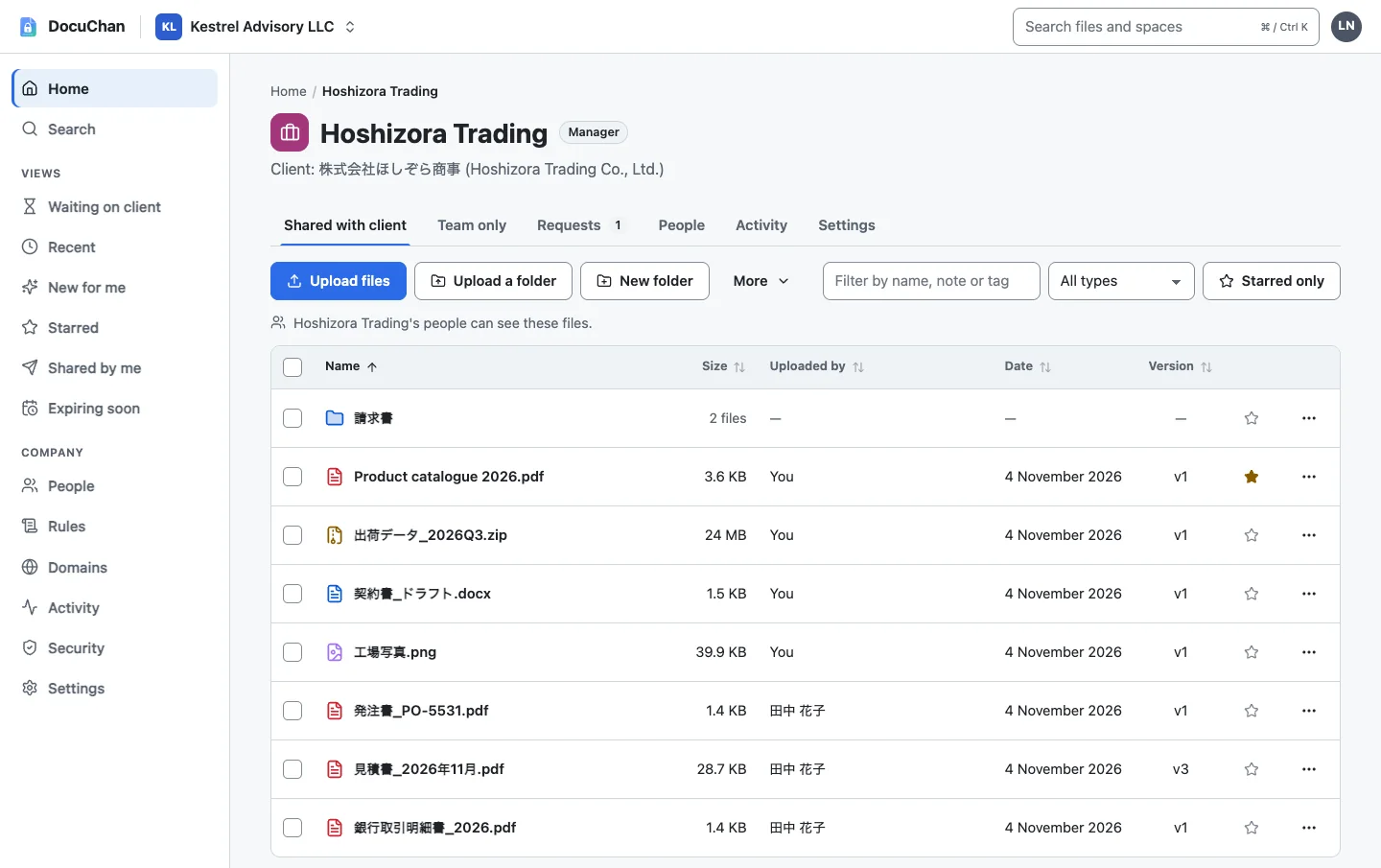
Each client gets a private space for everything you exchange with them. Files are locked on your computer before they upload, so our servers never see what's inside them or even what they're called. Your client opens them with Face ID or a fingerprint.

A client space in DocuChan: quotations, contracts and invoices with their size, who uploaded them and their version
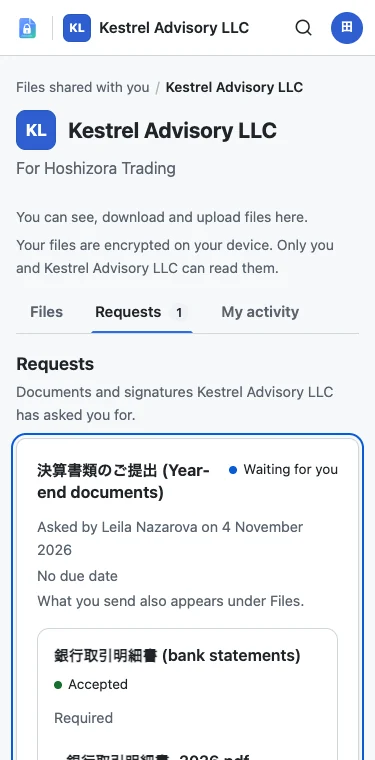
The client's view on a phone: the files and requests Kestrel Advisory shared, encrypted so only the two companies can read them
Locked on this laptop before upload Opened with Face ID · 14:03
Kestrel Advisory's space for its client Hoshizora Trading, and what the client sees on a phone. Every screenshot on this page is the real product; the companies, people and files are made up.

One quotation, from Leila's laptop to Tanaka-san's phone

Leila is an accountant at Kestrel Advisory. Tanaka-san is the finance manager at Hoshizora Trading, one of its clients. This is what happens when Leila sends a quotation.

Step 1 of 6

Leila drops the file into the client's space

Hoshizora Trading has its own space at Kestrel Advisory. Everything the two companies exchange goes there.

All six steps, as text
  1. Leila drops the file into the client's spaceHoshizora Trading has its own space at Kestrel Advisory. Everything the two companies exchange goes there.
  2. It's locked on the laptop, before it goes anywhereLeila's browser encrypts the file and its name. Only people on this space hold the key that opens it.
  3. Only locked data reaches our serverDocuChan stores it but can't read the name or the contents. We see its size and the time, nothing more.
  4. Tanaka-san gets an email with nothing in it worth stealingIt says a file is waiting. No attachment, nothing in it that opens the file, no password.
  5. Face ID unlocks it on Tanaka-san's phoneThe locked file comes down to the phone and is opened there. No password to type, no app to install.
  6. The file opens, and both sides see it on the recordThe copy carries Tanaka-san's address as a watermark. Leila sees when it was opened.

The same files, as you see them and as our server stores them

Switch between the two. Everything that would tell someone what the files are is locked before it leaves your device.

Hoshizora TradingShared with client
NameSizeUploaded byDateVersion
Quotation Q-2026-1101.pdf28.7 KBLeila Nazarova4 Nov 2026v3
Supply contract 2026.pdf1.5 MBLeila Nazarova2 Nov 2026v2
Bank statements 2026.pdf1.4 KBTanaka Hanako1 Nov 2026v1
Factory photos14 filesAziz Karimov28 Oct 2026—
Purchase order PO-5531.pdf1.4 KBTanaka Hanako27 Oct 2026v1

Sizes, dates and who belongs to the space stay visible: the service needs them to work. Names, contents, notes and comments don't.

  • File contents
  • File names, folder names, space names and client company names
  • Notes, tags, comments, request titles and checklist text
  • What you search for: search runs in your browser
  • Watermark text, which your browser adds
  • Any decryption key, passkey secret or recovery key

Visible to DocuChan's servers

  • People's names, as each person typed them, and their email addresses
  • The public parts of passkeys and account keys
  • Workspace display name, logo, verified domains and company rules
  • Who belongs to which workspace and space (as ids), and their roles
  • Each space's settings, such as the email domains it accepts for clients, watermarks, preview-only mode and end dates
  • Who may open each private file (as ids)
  • File sizes, counts, upload times and the folder structure (as ids)
  • Who uploaded or downloaded which file (by id) and when; IP addresses and devices, in the detail the company's rules set
  • Who was mentioned in a comment, but not what the comment says
  • Request due dates and status, and who signed or declined a signature request, and when
  • For password links: the recipient's email address, the end date and how many times the file was downloaded
  • The addresses of connected chat tools (Microsoft Teams, Telegram) and webhooks
  • The optional personal note in an invitation email, which is marked “not encrypted”
  • What our notification emails say: the company name, the sender's name and email, counts and due dates. They pass through our email provider and never name files, folders or spaces.

The full security explanation

Ask for documents, and stop chasing them

Send the client a checklist with a due date. DocuChan sends the reminders, they upload against each item, and you accept each file or send it back with a note.

  • Passport copies, bank details, last year's accounts
  • Uploads can go straight into Team only
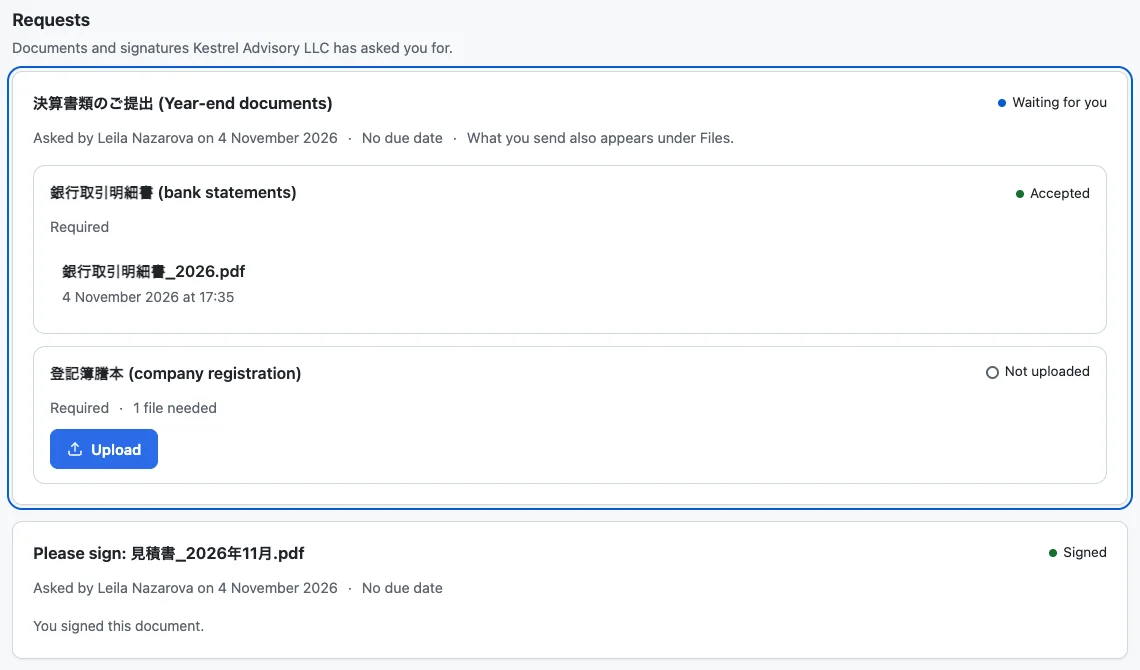
A document request as the client sees it: a checklist with an upload button for each item

Get a contract signed where it already is

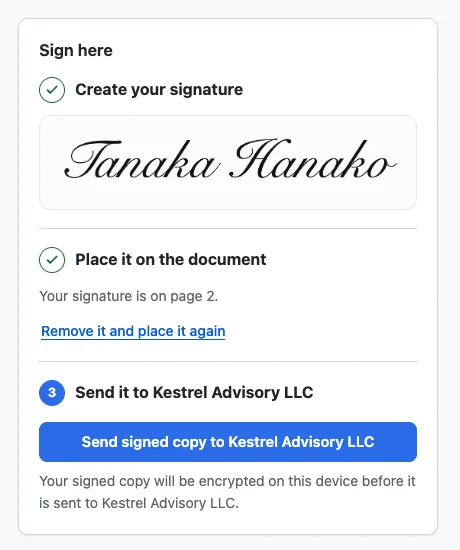
The client signs the PDF in their space. The signed copy comes back as the next version of the same file.

  • On a phone or a computer
  • No separate signing service
A contract being signed in the browser

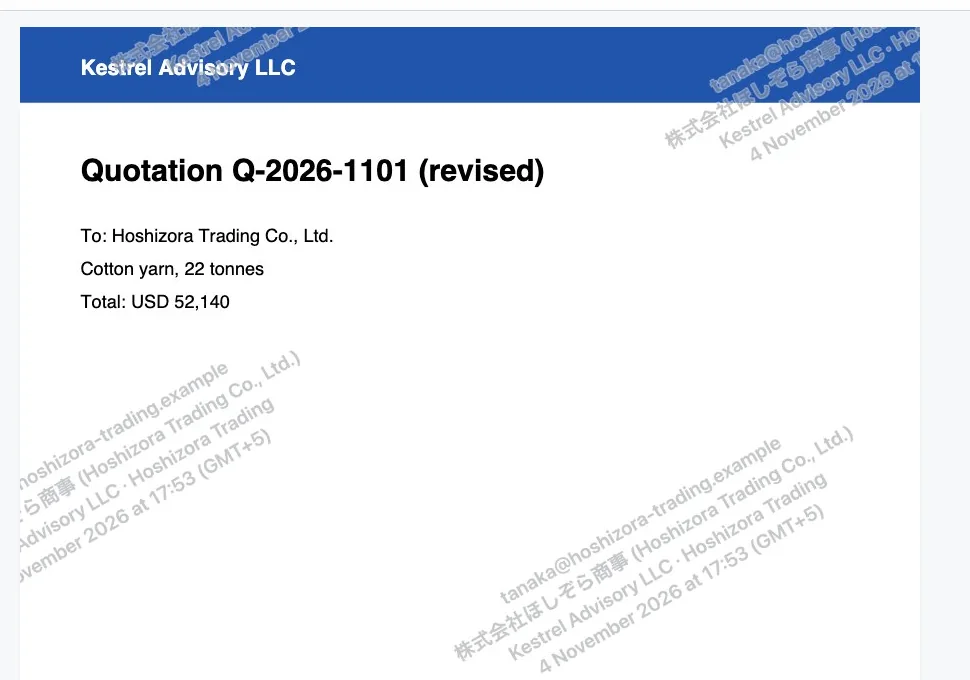
Every copy carries the reader's name

Each PDF or image a client opens is stamped with their email, company and the time. For drafts, choose preview only.

  • Set per space
  • It can't stop a photo of the screen
A quotation previewed by the client, stamped with the client's email, company and the time

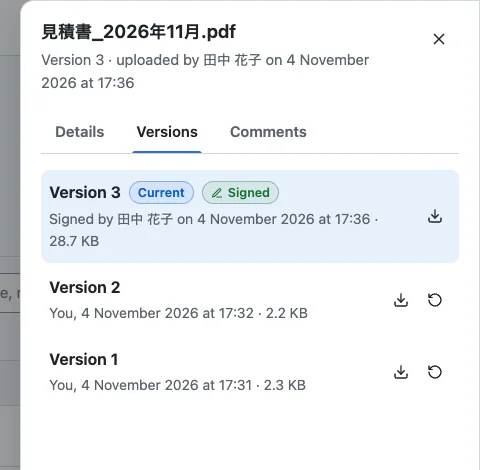
v3 of 3, and the first two are still there

Upload a new version on top of the old one. Earlier versions stay, and Managers and Editors can restore one.

  • Who uploaded each version, and when
The version history of a quotation: each version with who uploaded it and when

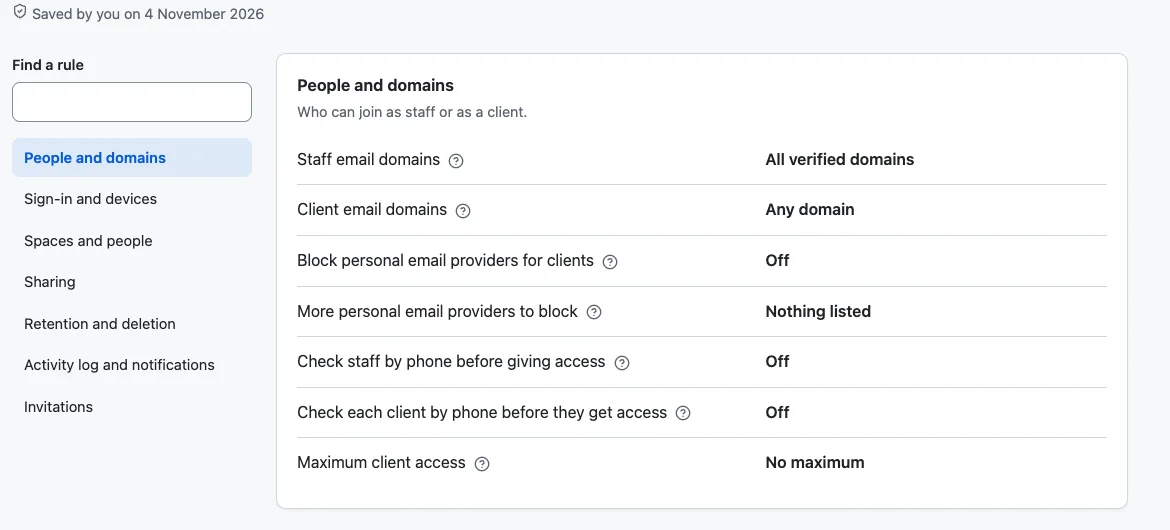
Your company's rules, on one page

Which email domains may join, which client domains are allowed, how long files are kept, when an idle browser locks. Changes are signed by an Owner and checked by every browser.

  • Only your verified domain joins as staff
  • Remove a leaver from everything in one step
The company rules page: sign-in, sharing, client domains and how long files are kept

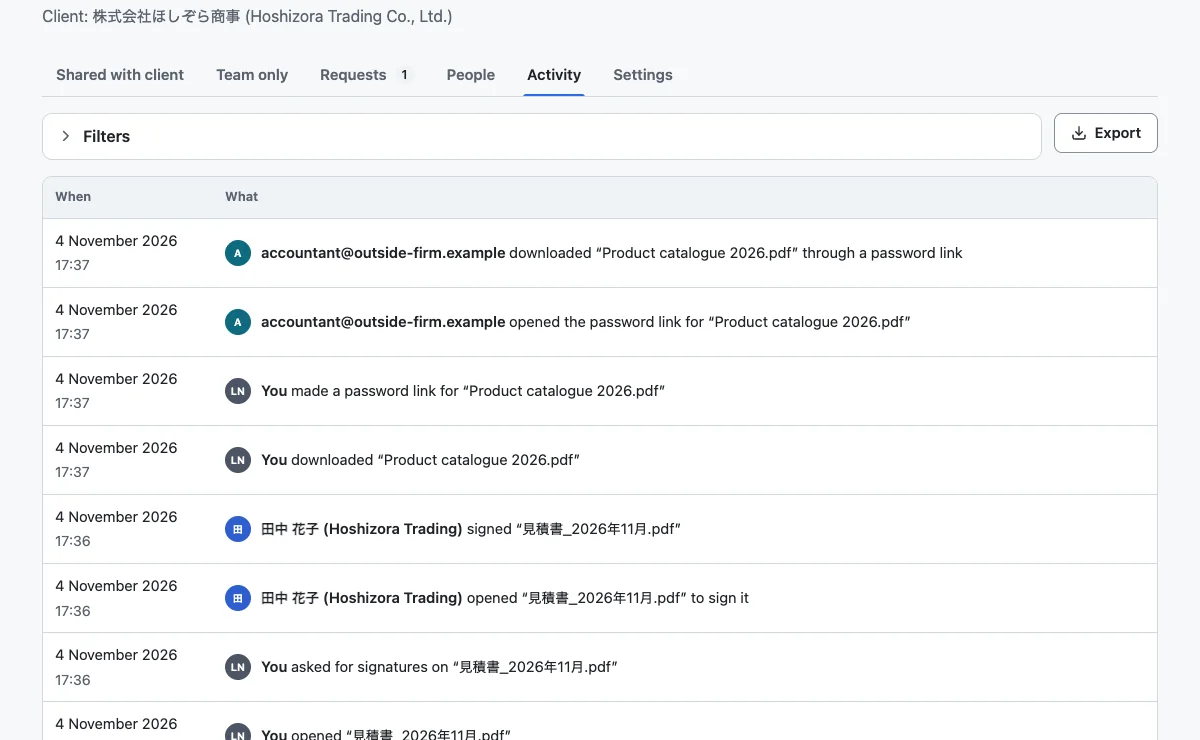
Every step on a record nobody can rewrite

Uploads, views, downloads, signatures and requests, with the person and the time. Each entry is chained to the one before, so a change or a gap shows. Export it signed when an auditor asks.

  • CSV or JSON, signed by the person exporting
The space's activity log: uploads, views, downloads and signatures with the person and time

How this differs from the file sharing you use now

Most file-sharing services encrypt your files on the way and on their disks, but they keep the keys. Their staff, an attacker on their servers or a court order can open your files. DocuChan never has the keys. They're made on your devices and passed only between your people and your clients.

Most services also know every file name, every folder and every client. We don't. Names, notes, comments and request checklists are encrypted the same way as the files.

And most still depend on passwords sent by email or chat. Here everyone you invite, staff and clients alike, signs in with a passkey on the phone or computer they already use, so no password has to travel.

Email and a passwordA typical cloud driveDocuChan Enterprise
Can the provider open your files? Yes, your email provider can Yes, it holds the keys No, it never has the keys
Can the provider see file names? Yes Yes No
Does a password travel by email or chat? Yes, in a second message Often, for shared links No, invited people use passkeys
Does the client need an app? No Sometimes No, the browser is enough
One place per client, for everything ever sent No Folders, if kept tidy Yes, a space per client
A record of who opened what No Usually, on paid plans Yes, and it can't be edited
Document requests and signatures in the same place No Add-ons Yes

What it looks like in your line of work

Four examples from the kinds of company it was built for.

Year-end for forty clients: each gets one checklist of bank statements, payroll and receipts. Reminders go out by themselves, and the finished returns come back signed.

  • One space per client
  • Requests with due dates
  • Signed returns as new versions

For your IT team

Files
AES-256-GCMA new key for every file, made in the browser.
Sign-in
PasskeysFace ID, a fingerprint or a device PIN. Invited staff and clients have no password.
Sharing keys
P-256 + ML-KEM-768Keys passed between people are sealed with two methods, one built to resist future quantum computers.
Records
Signed and chainedMembership, rules and invitations are signed in browsers; the activity log is hash-chained.
Storage
EU or Asia-PacificChosen when the workspace is created. Every file stays in that region.
Hosting
Ours or yoursRun it on your own servers, database and storage under a licence.

How the security works

Setting up takes an afternoon

  1. Create the workspaceCompany name, where files are stored (EU or Asia-Pacific) and a colour. Print the recovery kit and put it in the safe.
  2. Verify your email domainAdd one DNS record. From then on, only colleagues with your company address can join.
  3. Open a space for each clientInvite their people by email. They open it with a passkey in the browser.
  4. Move your next file thereInstead of a link and a password in two messages.

Works with what you already use

All optional. None of them ever receives the contents or names of your files.

Outlook add-in
Share into the right client space without leaving an email.
Directory sync
Add and remove staff automatically from Microsoft Entra ID or another directory that supports SCIM (System for Cross-domain Identity Management).
Your phone's Share button
Share a photo or PDF from any app on your phone straight into a client's space.
Webhooks
Your own systems hear that something happened, never what it was. Each message is signed.
Your name on it
Your logo, colour and sender name on every client page and email.

What it doesn't do

Better to hear these from us now.

No single sign-on
Everyone signs in with a passkey. There's no “sign in with Microsoft or Google” for company accounts.
Watermarks discourage leaks; they can't prevent them
Anyone who can see a file can photograph the screen.
Word and Excel files are downloaded, not previewed
Previewing them would mean our servers reading them.
We can't recover a lost workspace
If every Owner loses access and the recovery kit is lost too, nobody can open the files, including us.

Every limit, in detail

Questions

Who is it for?

Companies that hold other people's confidential documents: accounting and tax firms, law firms, consultancies, HR and payroll providers, trading companies and manufacturers sharing drawings.

Do our clients have to install anything?

No. They open the invitation in their browser and create a passkey with Face ID, a fingerprint or their device PIN. It works on phones and computers.

Can DocuChan read our files?

No. Files, names, notes and comments are encrypted on your devices before upload, and the keys never reach our servers. We see facts such as file sizes, times and who belongs to which space.

What does it cost?

A licence agreed with you directly, covering your workspace, people and storage. There's no subscription that renews by itself and no card kept on file.

Can we run it on our own servers?

Yes. Under a licence, DocuChan Enterprise runs on your own infrastructure with your own database and storage.

What happens when someone leaves or loses their phone?

Removing a person is one step: they come off every space, are signed out everywhere and the keys are changed. Someone who loses a phone gets back in with their personal recovery key, another of their devices, or a reset by the company.

Which languages does it speak?

English, Japanese, Russian, Spanish and Uzbek, for your team and your clients. There is also a Japanese edition at docuchan.bekito.co.jp.

Try it with one client first

We'll set up the workspace with you and run it beside your current routine with one client. If it's better, move the rest.

Or email docuchan@masterbek.uz

Talk to us